The digital transformation of Andhra Pradesh land records took a monumental leap forward with the launch of the Meebhoomi portal. Launched on June 13, 2015, by the Revenue Department of Andhra Pradesh, Meebhoomi has revolutionized how citizens, farmers, and real estate buyers access vital land-related documents. By providing a public, read-only interface connected directly to the secure Webland AP backend database, the portal ensures complete transparency in land transactions and effectively reduces administrative fraud. Whether you are verifying ancestral property boundaries, preparing for a sale, or conducting due diligence for a land purchase, this comprehensive guide will help you navigate the system effortlessly.
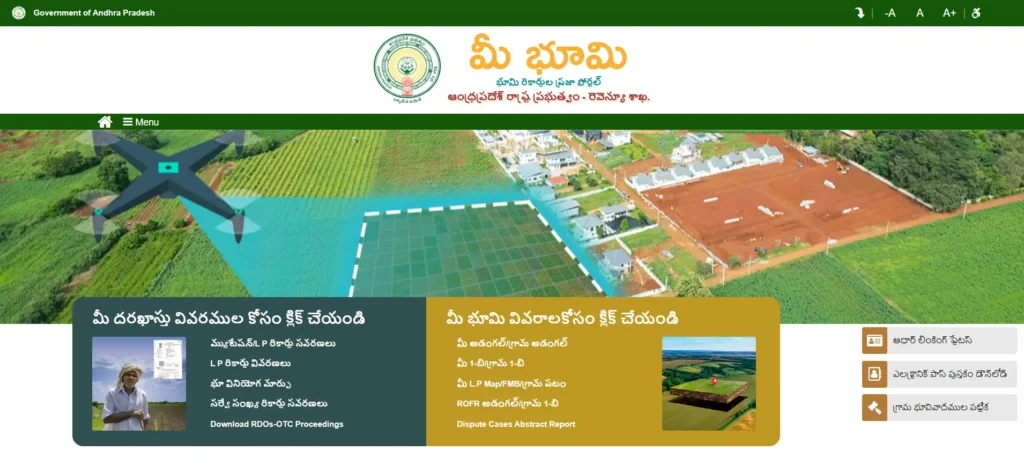
What Is Meebhoomi AP?
The word Meebhoomi translates literally to “Your Land” in Telugu. True to its name, the Meebhoomi portal operates as a public digital repository designed to offer easy access to land records and property ownership information in Andhra Pradesh. Historically, the maintenance of land records relied entirely on handwritten manual paper ledgers managed by the local Village Revenue Officer (VRO). This manual system left landowners vulnerable to document tampering, physical loss, arbitrary alterations, and massive bureaucratic delays.
To resolve these vulnerabilities, the state government established two interconnected portals:
- Webland AP (webland.ap.gov.in): Built and maintained by the National Informatics Centre (NIC), Webland functions as the secure, government-access-only backend database engine. Only authorized government revenue officials, such as VROs, Mandal Revenue Officers (MROs), and Tahsildars, can log in to Webland to update land registers, process mutations, and append digital signatures using biometric authentication.
- Meebhoomi AP (meebhoomi.ap.gov.in): This is the public-facing read-only frontend reader. The portal has no permission to write to or modify files directly; it simply pulls verified, digitally signed data from the Webland database to generate real-time reports for citizens.
To ensure that the digital database remains secure and immutable, the Andhra Pradesh government integrated Property Chain blockchain technology into the backend ledger system on November 22, 2023. This blockchain framework ensures that once an ROR 1B or mutation document is digitally signed by the Tahsildar, it is written to a decentralized block. No official can “silently” change a name, alter an extent, or modify a boundary without leaving a permanent, trackable digital footprint, making real estate fraud virtually impossible.
Key Services Offered on the Meebhoomi Portal
The Meebhoomi portal acts as a comprehensive, one-stop shop for property owners, buyers, and legal professionals conducting property due diligence. Instead of spending weeks chasing records at government offices, you can access multiple state-level land records online within seconds.
The key services managed through the Meebhoomi land records portal include:
- Adangal (Pahani) Retrieval: Instant view and download of the crop census book.
- 1B Record of Rights (ROR): Compulsory document showing verified property ownership.
- FMB (Field Measurement Book) Maps: Dynamic lookup of hand-drawn plot boundaries.
- Village Maps: Large-scale geographic layouts of entire revenue villages.
- e-Passbook (Electronic Pattadar Passbook): Digitally signed passbooks with active QR codes.
- Aadhaar and Mobile Number Seeding: Security checks to verify identity linking with land accounts.
- Mutation and Land Conversion Status: Real-time tracking of patta transfers and land conversion details.
- Litigation and Dispute Details: Searchable records of pending court disputes and revenue case files.
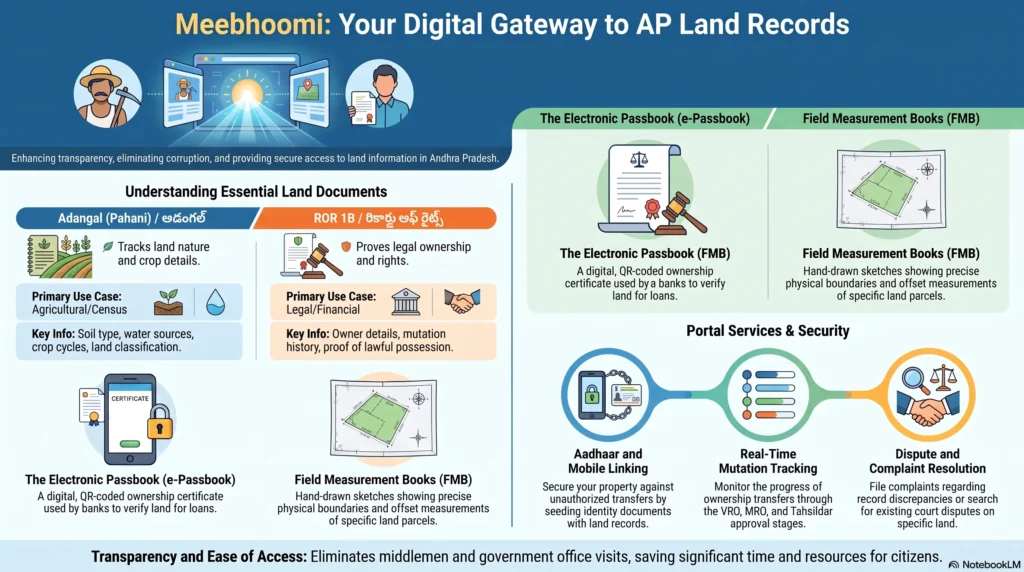
Meebhoomi Adangal vs 1B Records: Understanding the Difference
One of the most common sources of confusion for property owners is the difference between Meebhoomi Adangal and Meebhoomi 1B records. While they are often searched together, they serve completely distinct administrative and legal purposes.
Meebhoomi Adangal (Pahani)
The Adangal, traditionally known as the Pahani or Village Count Number 3, is an agricultural census register updated seasonally by the VRO. It contains detailed information about the physical reality of a land parcel. The Adangal displays the soil classification (such as dry Metta or wet Nanja), the primary source of water (canals, wells, or rain-fed), the crop variety cultivated, active tenancy status, and any active liabilities or mortgages. It is primarily a physical and agricultural log of the land rather than an absolute proof of title.
Meebhoomi 1B Record of Rights (ROR)
The 1B record is a purely legal document maintained by the Tahsildar at the Mandal level. It acts as a consolidated register of all land properties owned by a specific individual in a village. The Meebhoomi 1B shows the owner’s name (Pattadar name), father’s name, Khata (Account) number, survey numbers, precise land extent, and active bank mortgages or judicial freezes. This document is the primary legal certificate required for property registration, land transfer, bank loan applications, and court proceedings.
How to Search and Download Meebhoomi Adangal
Retrieving your agricultural record is a simple, automated process. Whether you are applying for a crop loan or verifying cultivation records, you can pull this file instantly.
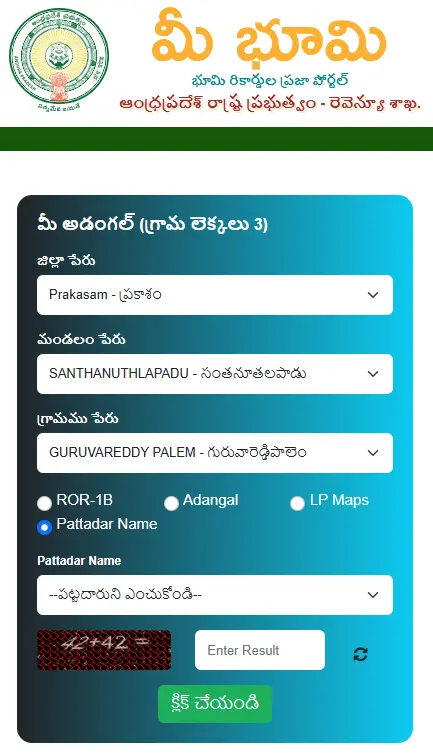
Step-by-Step Adangal Search Guide:
- Navigate to the Official Site: Open your browser and go to
meebhoomi.ap.gov.in. - Access the Adangal Module: Locate the Adangal option on the top navigation bar. Hover over it and select either Your Adangal (for an individual parcel) or Village Adangal (to view the entire village record).
- Choose Search Parameter: Select your preferred lookup identifier: Survey Number, Account (Khata) Number, Aadhaar Number, or Pattadar Name.
- Select Region Hierarchy: Use the dynamic dropdown lists to choose your District, Mandal (Zone), and Village.
- Submit Identifiers: Input your chosen search value (e.g., your plot’s survey number or Khata number).
- Verify with Captcha: Enter the mathematical or alphanumeric Captcha code into the verification text field.
- Generate and Print: Click Submit. The portal will load your Adangal record. Scroll down and click the Print button to save the file as a PDF on your device.
How to View and Download Meebhoomi 1B Records Online
The ROR 1B document is essential for checking legal titles and registering properties. To obtain a free, verified copy of your Meebhoomi 1B record, follow this tutorial:
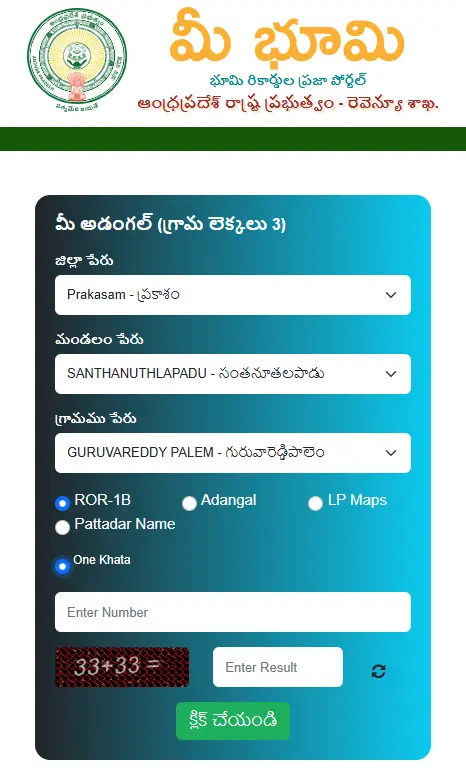
Step-by-Step 1B Download Guide:
- Open the Meebhoomi Portal: Go to
meebhoomi.ap.gov.in. - Locate the 1-B Tab: Click on 1-B in the primary navigation menu. Select Your 1-B or Village 1-B from the dropdown menu.
- Enter Regional Details: Input the correct District, Mandal (Zone), and Village from the dynamic dropdown fields.
- Select Search Input: Choose to search using your Account (Khata) Number, Survey Number, Aadhaar Number, or Pattadar Name.
- Execute Security Check: Solve the Captcha displayed on the screen.
- View and Save: Click the submit button. The platform will open your Record of Rights. Click the Print icon at the bottom of the page, choose “Save as PDF”, and securely archive the file.
How to Download Meebhoomi FMB Maps Online
The Field Measurement Book contains hand-drawn sketches of land parcels, complete with offset values, dimensions, and survey points. It is a vital document for planning physical constructions, settling boundary disputes with neighbors, and ensuring your title deeds match physical boundaries.
Step-by-Step Meebhoomi FMB Extraction:
- Access the FMB Link: Visit
meebhoomi.ap.gov.inand select F.M.B from the top header menu. - Select Location Details: From the dropdown lists, select your District, Mandal, and Village name.
- Input Survey details: Enter your plot’s specific Survey Number.
- Bypass Captcha Check: Enter the security Captcha value and click the search/click button.
- Download FMB Layout: The portal will load your hand-drawn FMB map, displaying components like FLines (real field boundaries), GLines (geometric outline triangles), and Ladder data (left/right offset measurements). Click Print to export the map as a PDF.
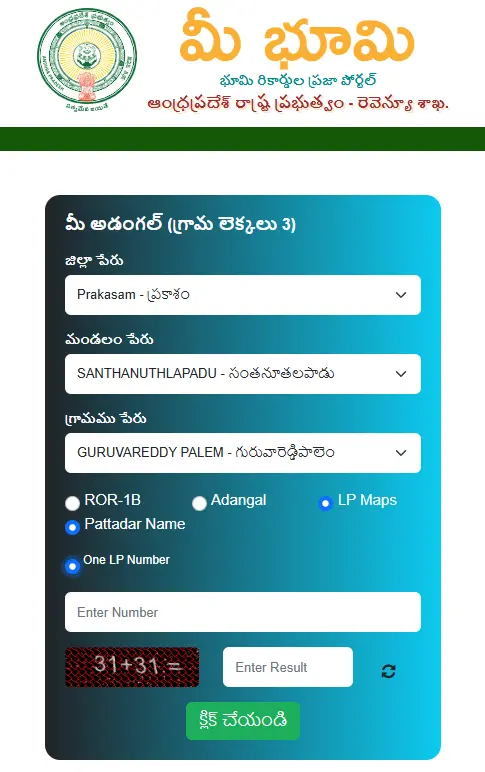
How to View and Download the Meebhoomi Passbook (e-Pattadar Passbook)
The Meebhoomi passbook (electronic Pattadar Passbook) is a secure, QR-coded digital version of the traditional physical land booklet. The digital passbook contains a verified summary of your landholdings, linked Aadhaar status, and ownership details, which can be scanned by banks to instantly verify loan eligibility.
Step-by-Step e-Passbook Download Process:
- Navigate to the Passbook Module: Go to the official Meebhoomi portal and select the Electronic Passbook tab.
- Fill out Geographical Hierarchy: Select the District, Mandal (Zone), and Village where your property is situated.
- Provide Identification Number: Input your Account (Khata) Number or Aadhaar Number.
- Enter Phone Details: Submit your registered Mobile Number, input the security Captcha, and check the User Consent box.
- OTP Authentication: Click the submit button to trigger an OTP sent to your registered mobile phone.
- Retrieve Secure Passbook: Enter the received OTP into the validation prompt and click submit. Your QR-coded Meebhoomi passbook will load as a PDF. Save and print it.
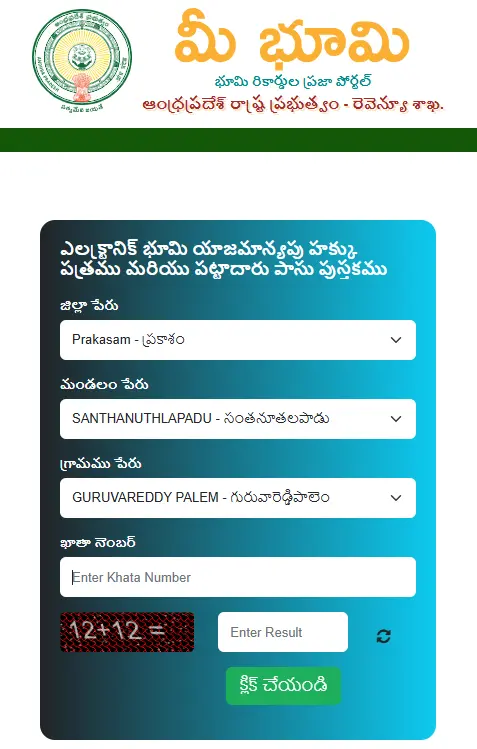
How to Link Aadhaar on MeeBhoomi AP
Linking your Aadhaar card to your Andhra Pradesh land records is an essential step to prevent administrative land grab attempts, block fraudulent registrations, and secure eligibility for state welfare subsidies.
Step-by-Step Aadhaar Seeding Guide:
- Open the Aadhaar Module: Go to
meebhoomi.ap.gov.inand hover over the Aadhaar/Other Identities tab on the primary menu bar. - Click Aadhaar Seeding: Select the Aadhaar Linking option from the dropdown menu.
- Provide Regional Metadata: Enter your District, Mandal, and Village.
- Enter Account and ID Numbers: Input your Account (Khata) Number and your 12-digit Aadhaar Number.
- Consent and Submit: Tick the User Consent checkbox to authorize CCLA/UIDAI biometric verification, solve the mathematical Captcha, and click the submit button.
- Track Request Status: The portal will initiate the seeding process. To check your status, click on the Aadhaar Request Status option in the same menu to verify if your UIDAI seeding has been successfully approved by the Webland backend database.
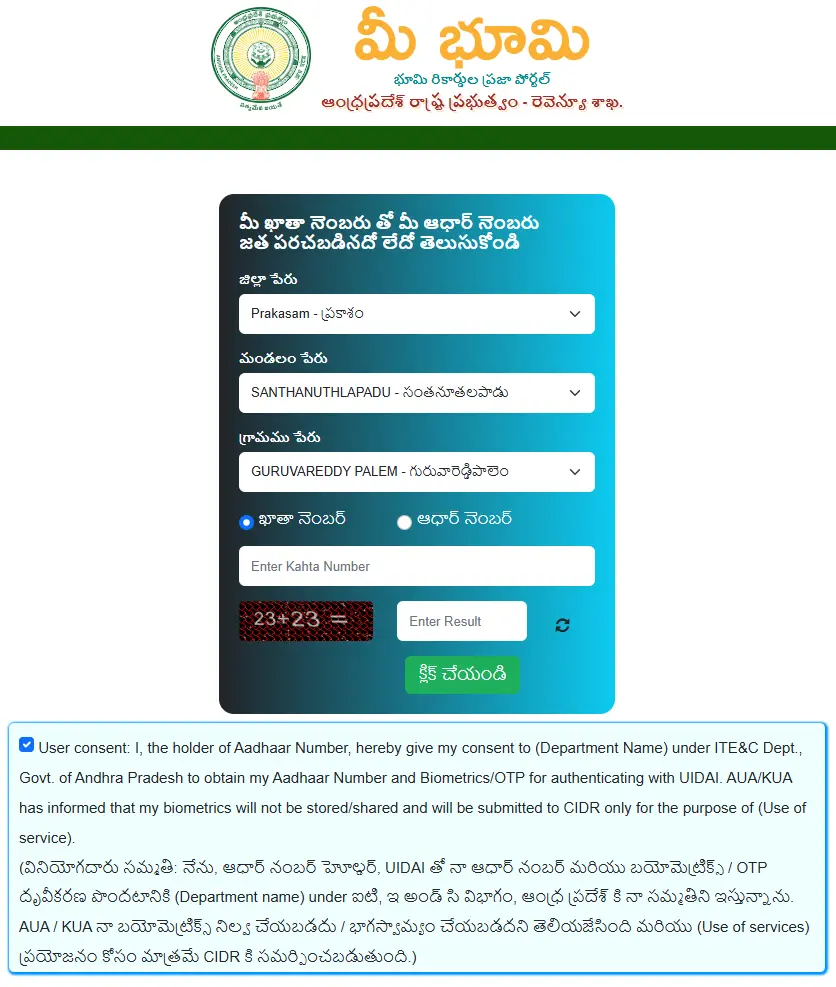
How to Check Land Conversion and Webland Mutation Status
After purchasing agricultural land, you must complete the legal transfer of title, known as mutation or patta transfer. The mutation request is processed through the secure Webland AP backend by the Mandal Revenue Officer (MRO). You can easily track where your transfer stands on the Meebhoomi portal.
Step-by-Step Mutation Status Tracking:
- Locate tracking page: Visit
meebhoomi.ap.gov.inand select the Land Conversion Details (or Mutation Status) tab. - Input Geographic Filters: Choose your District, Mandal, and Village name.
- Enter Search Parameters: Input your Survey Number or your MeeSeva Application Number.
- Submit Query: Enter the captcha security code and click Submit.
- Review Real-Time Stages: The system will display the current status of your mutation request—indicating if it is pending VRO verification, awaiting MRO field check, or finalized with the Tahsildar’s digital signature.
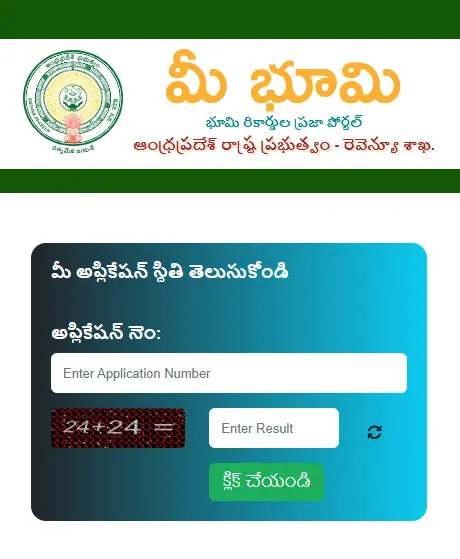
Common Problems on the Meebhoomi Portal and How to Solve Them
Despite its robust features, users frequently experience technical and administrative errors. Below are the most common portal problems and their exact solutions.
1. Fixing the Mobile “JSON Error” on Android and iOS
- The Problem: While selecting Mandal or Village dropdown options on smartphones, the portal frequently crashes with a generic
JSON ErrororServer Not Accessibletimeout. This is caused by high server latency and unoptimized browser integration. - The Solution: Do not use unofficial third-party apps. Clear your mobile browser cache (Chrome/Safari), enable Desktop Site Mode in settings, or run the portal in Incognito/Private Mode. The portal performs best during off-peak hours (early morning or late night).
2. Solving the “Webland Not Signed” (Red Text) Error
- The Problem: Your land records load on Meebhoomi, but all information is shown in red text with a bold warning: Record is Digitally Unsigned in Webland backend. Banks will reject unsigned records for loan collateral, and sub-registrars will refuse to execute any property registrations.
- The Solution: Download your unsigned Adangal or 1B. Submit a physical written application to your local M Mandal Revenue Officer (MRO) / Tahsildar along with registered sale deeds, tax receipts, and Aadhaar. The Tahsildar must log into the secure backend Webland AP portal, execute biometric verification, and digitally sign the record to update it on the public site.
3. The Section 22A Prohibited Lands Register Trap
- The Problem: Private property owners find their lands frozen and placed under the Section 22A Prohibited Registration list without their knowledge. This occurs because the initial digitization in 2015 relied on old British-era Resettlement Registers (RSR), misclassifying private patta lands as public poramboke or assigned lands.
- The Solution: Search the Section 22A list using your survey number on the portal. Gather your registered deeds, tax receipts paid over decades, and ancestral RSR copies to prove private title chain. File an appeal petition with your local Tahsildar or Revenue Divisional Officer (RDO). The government is executing drone-based surveys to correct these misclassifications.
4. Third-Party App Store Ad Scams
- The Problem: Private app store developers publish portals filled with ads that request invasive phone permissions, claiming to be official “AP Meebhoomi Apps”.
- The Solution: The Government of Andhra Pradesh has not launched an official mobile app for Meebhoomi. Always access land records exclusively through a secure mobile browser at
meebhoomi.ap.gov.in.
Traditional Land Records vs Meebhoomi Portal: A Comparative Review
To understand how the modern system has simplified land administration, we must look at how the portal compares to the traditional manual system:
| Operational Metric | Traditional Manual System | Meebhoomi AP Portal (Digital System) |
|---|---|---|
| Record Authority | Entirely managed by the local Village Revenue Officer (VRO) in handwritten paper ledgers. | Centralized backend database engine (Webland AP) with a public-facing reader (Meebhoomi). |
| Record Security | Prone to document tampering, physical loss, unauthorized modifications, and delays. | Highly secure. Integrated with Property Chain blockchain, making verified records immutable. |
| Retrieval Timeline | Required multiple physical visits to Tehsil or MRO offices, taking weeks to get certified copies. | Instant lookup and download of Adangal and 1B in less than 60 seconds. |
| Identity Verification | No public verification of Aadhaar seeding, increasing double-registration scams. | Mandatory Aadhaar linking and biometric checks prevent double registrations. |
| Legal Validity | Handwritten, manual documents with a higher risk of stamp duty miscalculation. | QR-coded digitally signed documents with direct integration into the sub-registrar office systems. |
Frequently Asked Questions (FAQs) About Meebhoomi
What is the main difference between Adangal and 1B records?
- Adangal (Pahani) lists the physical characteristics of the land, crop details, soil type, irrigation sources, active tenancies, and occupant names for agricultural parcels.
- 1B (Record of Rights) is a legal document maintained by the Tahsildar that establishes ownership rights, showing the Pattadar’s name, Khata number, survey numbers, precise extent, and active bank mortgages.
Why does my land record display in red text on Meebhoomi?
If your record shows up in red text, it means it is digitally unsigned on the Webland backend database. Unsigned records are legally invalid for property registration, bank loans, or receiving government subsidies. You must submit a written request with your title deeds to your local M Mandal Revenue Officer (MRO) to have the Tahsildar digitally sign and activate the record.
What should I do if my property is locked under Section 22A?
Section 22A locks property registrations to prevent the sale of government-owned or assigned land. If your private patta land was locked due to a digitization error, you must file an appeal with your local Tahsildar or RDO. Provide your registered sale deeds, decades of tax receipts, and British-era Resettlement Register (RSR) copies to prove your private chain of title.
Is the free online downloaded Meebhoomi document valid in court?
The free online copies of Adangal and 1B downloaded from the Meebhoomi portal are intended for informational purposes and general due diligence only. If you require a legally valid document for court disputes, bank registrations, or property sales, you must apply for a certified copy with a digital signature through the MeeSeva portal or a physical citizen service kiosk.
Can I find active court disputes on my land using Meebhoomi?
Yes. The portal has a dedicated Details of Court Disputes section. You can select your district to download a detailed PDF containing all active land litigation details, petitioner names, respondent details, and active survey numbers in that zone.
Final Thoughts on Digital Andhra Pradesh Land Records
The launch of the Meebhoomi portal has successfully brought transparency, speed, and security to Andhra Pradesh land records management. By linking the public frontend with the secure backend Webland database and applying Property Chain blockchain security, the system has eliminated major bottlenecks, reduced the influence of middlemen, and returned control of property records directly to the citizens.
Whether you are a buyer conducting property title search, a local farmer checking seasonal crop patterns, or an NRI managing ancestral land boundaries, Meebhoomi is an indispensable tool. Check your digital records regularly, resolve unsigned red-text warnings immediately, and ensure your Aadhaar card is seeded to safeguard your property rights.